


Doing local SEO for a single location is already a challenge. Scale that to multiple locations, and the complexity multiplies fast – because each location essentially demands its own SEO campaign with its own keyword targets, Google Business Profile, citations, and localized content.
A business with 10 locations isn’t running one SEO strategy. It’s running 10.
That’s where most businesses either cut corners – duplicating content, ignoring individual GBP profiles, or treating all locations as one – and wonder why their rankings are stuck.
If you’re struggling to get your locations to rank in local search, this guide is built for you. By the end, you’ll have a clear, actionable system to optimize every location, show up in the local pack, and turn local search into a consistent source of customers across every market you operate in.
Let’s get into it.
What is Multi-Location Local SEO and How to Do It?
Multi-location local SEO is the process of optimizing your online presence – both your website and Google Business Profiles so that each of your business locations ranks prominently in its own local market.
The goal is simple: when someone in Austin searches for “dentist near me” or “best restaurant in Chicago,” the right location shows up for the right city. Not just your homepage. Not just your best-performing branch. The specific location that serves that customer.
This means ranking in two key places:
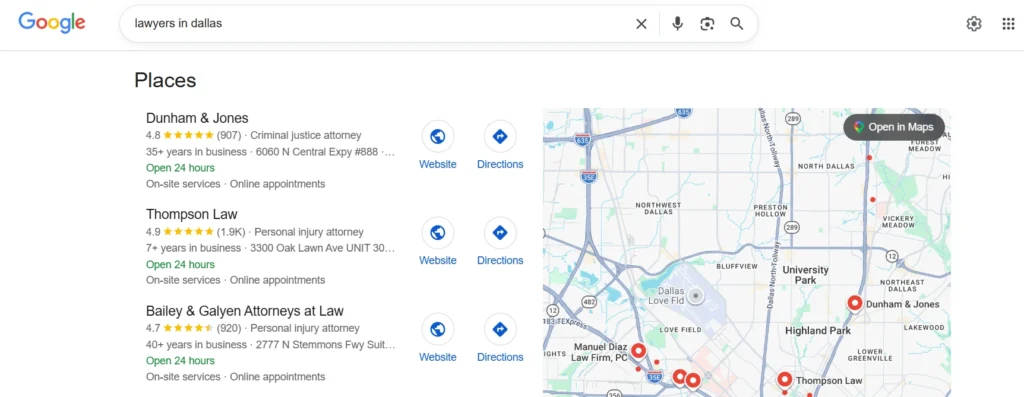
1. Google’s Local Pack: The map-based results that dominate the top of local searches
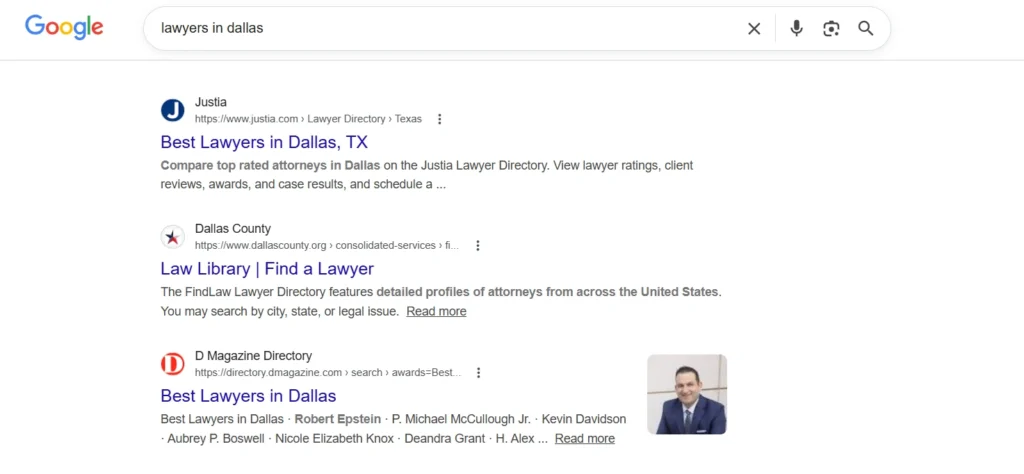
2. Organic Search Results: Your location-specific web pages ranking for city or neighborhood-level keywords
For a business with multiple locations, this isn’t a single SEO effort. Every location needs its own optimized Google Business Profile, its own dedicated webpage, and its own local signals – citations, reviews, and localized content – to compete in that specific market.
Here’s the complete guide to do do local SEO for multi-location businesses:
1. Build a Scalable Website Structure
Everything in multi-location local SEO starts with your website. Before you think about Google Business Profiles, citations, or link building – your website needs a structure that can support every location you operate in, cleanly and independently.
Get this right, and every other effort you put in gets amplified. Get it wrong, and you’ll be fighting your own website architecture for rankings.
The Golden Rule: One Location, One Dedicated Page
Most business owners say – we would just add every location name on a single page and we can get results with this only. You can never achieve better rankings and leads from this method.
Every location your business operates in needs its own standalone page on your website. Not a section on your homepage. Not a dropdown in your contact page. A fully developed, individually optimized, location-specific page.
A dedicated page gives Google exactly what it needs: a focused, location-specific signal it can confidently serve to the right searcher.
Clean and Consistent URL Structure
Your URL structure needs to be logical, readable, and scalable from day one because changing it later means redirects, lost link equity, and a lot of unnecessary headaches. Here’s what works:
✅ yourwebsite.com/locations/austin/
✅ yourwebsite.com/locations/dallas/
If you offer multiple services across locations, you can go one level deeper:
✅ yourwebsite.com/locations/austin/physiotherapy/
✅ yourwebsite.com/locations/austin/sports-rehabilitation/
What to avoid:
❌ yourwebsite.com/austin-location-page-1
❌ yourwebsite.com/page?id=23&city=dallas
❌ yourwebsite.com/locations/loc1/
Or any url structure that is neither helpful for users nor search engines.
Build a Location Hub Page
Before you even get to individual location pages, you need a central /locations/ hub page that lists and links to every location you operate. Consider it as a pillar page for locations which will have multiple location pages acting as cluster or supportive pages.
This page serves two purposes. For users, it’s a clean directory – they land here, find their city, and navigate to the right page. For Google, it’s a signal that these location pages are interconnected and part of a structured, intentional architecture rather than a random collection of pages. Keep this hub page simple:
- A brief intro about your business and the markets you serve
- A list or card-based layout of all locations with links
- A map showing all your locations if feasible
The hub page itself can also rank for broad queries like “[business type] locations in US” or “[brand name] near me”. So don’t leave it thin.
What Every Location Page Must Include?
This is where most multi-location websites fall apart. Businesses either duplicate the same content across every page by swapping only the city name or they build skeleton pages with barely any content at all. Both approaches fail.
Each location page needs to be treated as a standalone landing page, built specifically for that market. Here’s what it must contain:
NAP Information (Name, Address, Phone)
Your business name, full address, and local phone number need to be clearly visible on the page – ideally near the top and in the footer. This is the foundation of local SEO. Every detail must exactly match what’s listed on your Google Business Profile and across all your citations. Even minor inconsistencies – a missing suite number, a different phone format – can dilute your local rankings.
Localized, Unique Content
This is the hardest part to scale, but the most important. Each location page needs content that is genuinely written for that location – not a template with the city name swapped in.
Mention the neighborhoods you serve. Reference local landmarks near your office. Talk about the specific needs or context of customers in that city. Google is sophisticated enough to recognize thin, templated content and it rewards pages that demonstrate real local relevance.
An Embedded Google Map
Embed the Google Maps listing for that specific location directly on the page. It reinforces the geographic signal, helps users navigate, and contributes to the overall local relevance of the page.
Location-Specific Reviews and Testimonials
Pull in reviews or testimonials from customers at that specific location. Don’t show the same generic reviews across all pages. If you can display your Google rating for that branch, even better – it builds trust and keeps the content locally authentic.
A Clear Call to Action
Each location page should drive a specific action – book an appointment, call this branch, get directions, request a quote. Make it obvious, make it local, and make it easy.
Avoid Duplicate Content Across Location Pages
It bears repeating because it’s the most common mistake: do not copy-paste content from one location page to another with only the city name changed.
Google sees through it immediately. Pages with near-identical content offer no unique local value, and they’ll either rank poorly or compete against each other – a problem called keyword cannibalization that actively hurts your overall local visibility.
If scaling unique content feels overwhelming across 10, 20, or 50 locations then, start with your highest-priority markets. Write fully unique content for those first, then build out others progressively. A well-written page for 5 locations will outperform a templated page for 50 every time.
2. Google Business Profile Optimization for Multiple Locations
If there’s one thing that drives local rankings more than anything else, it’s your Google Business Profile. It’s the engine behind the local pack – those top 3 map results that capture the majority of clicks on any local search.
For a single location, managing GBP is straightforward. For multiple locations, it becomes a system you need to build because each location needs its own fully optimized, actively managed profile. A neglected or incomplete GBP for even one location means that branch is essentially invisible in local search.
Create a Separate GBP for Every Location
Every physical location your business operates needs its own individual Google Business Profile. Google’s local algorithm evaluates each profile independently. Your Austin profile’s reviews, activity, and completeness have zero impact on how your Dallas profile ranks. They are treated as separate entities, and they need to be managed that way.
Each profile must have:
- The exact business name (consistent across all locations)
- A unique local address
- A local phone number specific to that branch
- The correct business category
- Accurate business hours
- The location’s specific website URL — ideally pointing to its dedicated location page, not your homepage (we’ll come to this in upcoming sections)
If any of these are missing or inconsistent, you’re leaving a gap that your competitors will fill.
Use Google Business Manager for Bulk Management
Managing 5, 10, or 20 GBP profiles individually from separate logins is a recipe for chaos.
Google Business Manager (also called the Business Profile Manager) solves this. It lets you oversee all your locations from a single dashboard. From here you can:
- Add and verify multiple locations at once
- Make bulk edits across profiles (hours, descriptions, attributes)
- Monitor reviews and Q&A across all locations in one place
- Assign team members or agency access to specific locations
- Track performance insights per location
If you have 10 or more locations, Google also allows bulk verification via a spreadsheet upload rather than verifying each profile one by one which is a significant time saver when you’re scaling.
Verify Every Single Location
Verification is non-negotiable. An unverified GBP profile won’t rank. Google offers a few verification methods depending on your business type and number of locations:
- Video verification: most common for new profiles
- Phone or email verification: available for some business types
- Bulk verification: available for businesses with 10+ locations (learn more about GBP bulk verification)
Optimize Every Profile Completely
This is where most multi-location businesses cut corners. They pour effort into their flagship or highest-revenue location and treat the rest as afterthoughts.
Google rewards completeness. A fully optimized profile signals to Google that your business is active, legitimate, and relevant – all of which feed into local rankings.
For every location, make sure you’ve covered:
Business Category: Choose the most accurate primary category for each location. This is one of the strongest ranking signals in GBP. Add secondary categories where relevant, but don’t stuff categories that don’t apply. Most businesses just choose one category and miss out on the benefits they could get by adding other similar categories.
Business Description: Write a unique description for each location. Mention the specific services available at that branch, the area it serves, and anything locally relevant. Keep it natural – this isn’t the place for keyword stuffing, but it is the place to clearly communicate what that location offers.
Photos and Videos: Profiles with photos consistently outperform those without. Add high-quality images of the interior, exterior, team, and work for each location. Use location-specific photos – not the same stock images across every profile. Google also favors profiles where customers upload their own photos, so actively encourage this.
Services and Products: List the specific services or products available at each location. If some locations offer services that others don’t, reflect that accurately. This helps Google match the right profile to the right search query.
Attributes: Attributes are the small details that make a big difference – things like “wheelchair accessible,” “free parking,” “appointments required,” or “women-led business.” Fill these out for every profile. Searchers filter by these, and Google factors them into relevance.
Business Hours and Special Hours: Keep hours accurate and updated – especially for holidays or seasonal changes. Inaccurate hours are one of the fastest ways to lose customer trust and accumulate negative reviews.
Manage Q&A Actively
The Q&A section on GBP is publicly visible and often overlooked. Anyone can ask a question – and anyone can answer it, including random users who may provide incorrect information. For every location’s profile, make it a habit to:
- Monitor new questions regularly
- Answer every question promptly and accurately
- Proactively add your own Q&As for common questions customers ask at that location (opening hours, parking, payment methods, etc.)
Unanswered questions or wrong answers sitting on your profile can cost you customers and credibility.
Build a Review Strategy for Each Location
Reviews are one of the most powerful local ranking signals – and for multiple locations, you need a system, not a one-off ask.
- Prompt customers at each location to leave a review immediately after a positive experience – in person, via SMS, or through a follow-up email with a direct link to that location’s GBP
- Respond to every review, positive or negative, on every profile. Google notices engagement – and so do potential customers
- Never copy-paste the same response across reviews. Personalize each reply, even if slightly
A location with 200 genuine, well-responded reviews will almost always outrank a competitor with 40 – all else being equal.
3. On-Page SEO for Location Pages
You’ve built dedicated location pages with the right URL structure. Now comes the part that tells Google and your visitors – exactly what each page is about and which local market it serves.
Here’s what to get right on every location page.
Title Tag
For location pages, the formula is simple:
Primary Keyword + City Name | Brand Name
Keep it under 60 characters, include the city name, and make sure every location page has a unique title tag – never duplicate across locations.
Meta Description
Meta descriptions don’t directly influence rankings but heavily impact click-through rate. Keep it under 155 characters and make it location-specific. Never paste the same meta description across multiple location pages.
Header Tags (H1, H2, H3 etc.) & Body Content
Every location page needs one H1 that clearly states what you do and where. Such as – Dental Clinic in Austin.
Use neighborhood names where possible – they add local relevance and capture more specific searches without needing a separate page.
Your H2s should naturally reinforce local context:
- Our Physiotherapy Services in Austin
- Why Austin Patients Choose {Brand Name}
- Located Near {Nearby Location}
For body content, write for the location – not just about it. Mention specific neighborhoods you serve, nearby landmarks, and locally relevant context. A page that genuinely feels written for your specific location will always outrank one that just has “location name” inserted into a generic template.
However there is no word limit for SEO but aim for at least 800–1000 words of genuine content per location page.
Embedded Google Map
Embed the Google Maps listing for that specific location directly on its page – not a generic map of the area, but the actual pinned listing of your business.
It reinforces the geographic signal for Google and makes it effortless for visitors to get directions. It’s a small addition that contributes meaningfully to both local relevance and user experience.
Local Schema Markup
Schema markup is structured data you add to your page’s code to help Google understand your business details precisely – without having to interpret them from your content. For location pages, use LocalBusiness schema in JSON-LD format.
Every location page needs its own schema block with details specific to that branch. Use Google’s Rich Results Test to validate your markup after implementation.
Local Images
Images are an easy win that most location pages ignore. Don’t use the same stock photos or clinic images across every location page. Google can detect duplicate media, and it adds nothing to local relevance. For each location, use:
- Photos of the actual premises – exterior, interior, signage
- Images of the local team at that branch
- Alt text that includes the location and relevant keyword naturally (e.g., “physiotherapy treatment room at {Your Business Name + Location}”)
Locally authentic images signal to both Google and visitors that this is a real, active location – not a duplicate page built just to capture traffic.
Customer Reviews
Displaying location-specific reviews on each page adds two things simultaneously: trust for visitors and fresh, user-generated local content for Google.
Pull in reviews from customers at that specific branch – not generic testimonials that appear across every location page. If you can embed your live Google rating for that location, even better.
A location page showing 4.8 stars from 180 Austin patients will convert and rank significantly better than one with no social proof at all.
Internal Linking
Three patterns every multi-location site should implement:
- Hub → Location pages — your /locations/ page should link to every individual location page
- Location pages → Service pages — link to services offered at that specific branch
- Between nearby locations — subtly cross-link close locations where it makes sense for the user
Watch Out for Keyword Cannibalization
If two location pages target nearly identical keywords, they’ll compete against each other instead of complementing each other. Fix this by:
- Assigning one unique primary keyword per location page
- Differentiating with neighborhood-level or service-specific keywords
- Using Google Search Console to spot pages ranking for the same query
4. Local Citations
A local citation is any online mention of your business’s Name, Address, and Phone number – commonly referred to as NAP. These mentions appear on business directories, review platforms, social media profiles, and industry-specific listing sites.
Citations are one of Google’s trust signals for local rankings. When Google sees your business information mentioned consistently across multiple credible sources, it gains confidence that your business is legitimate, established, and located where you say it is. That confidence translates into better local rankings.
For a multi-location business, this means building and maintaining a separate, accurate citation profile for every location you operate.
Where to Build Citations?
Not all citation sources carry equal weight. Focus on these in order of priority:
Tier 1 – Core Platforms: These are the highest-authority, most widely trusted platforms. Every location must be listed here:
- Google Business Profile
- Yelp
- Apple Maps
- Bing Places
- Facebook Business Page
- Better Business Bureau (BBB)
Tier 2 – Industry-Specific Directories: After the core platforms, get listed on directories specific to your business type. A healthcare clinic should be on Healthgrades and Zocdoc. A law firm should be on Avvo and FindLaw. A restaurant should be on TripAdvisor and OpenTable. These niche citations carry more relevance than a generic directory listing because they directly reinforce what your business does and where.
Tier 3 – Local and Regional Directories: Look for city or region-specific directories relevant to each location’s market. A listing on a Chicago-specific business directory carries more local relevance for your Chicago location than a national platform that lists businesses from everywhere. Local Chamber of Commerce listings fall into this category and are particularly valuable.
Pro Tips for Multiple Location SEO Success
1. Post Regularly on Every GBP
Google Posts are one of the most underused features in GBP – especially across multiple locations. Regular posting signals to Google that a profile is active, which positively influences rankings.
Post at least once or twice a week per location. Your posts can include:
- Offers or promotions specific to that location
- Local events or community involvement
- New services or products available at that branch
- Customer success stories from that location
You don’t need entirely unique content for every post across every location – but localize where you can. A post about a Bangalore-specific promotion performs better than a generic national announcement on a Bangalore GBP profile.
2. Create Blogs Around Localized Topics
Most multi-location businesses run a single blog and publish generic content that applies to everyone – and stands out to no one. Here’s the opportunity they’re missing: localized blog content.
Instead of writing “5 Tips to Recover from a Sports Injury” and calling it a day, a physiotherapy clinic with locations across multiple cities could publish:
- “ACL surgery cost in Austin”
- “Cost of electrician in London”
Each of these targets a specific local audience, incorporates city-level keywords naturally, and gives Google more location-relevant content to associate with that branch – all without adding more pages to your location structure.
3. Get High Quality Backlinks
Backlinks remain one of the strongest ranking signals in SEO and for local SEO, the relevance of those backlinks matters just as much as the authority. But most businesses ignore backlinks when focusing on Local SEO.
A link from a local news outlet in Dallas does more for your Dallas location’s rankings than a generic link from a high-authority national site that has no geographic connection to your market.
For multi-location businesses, the goal is to earn location-specific backlinks for each branch – not just accumulate links that point to your homepage.
Here are a couple of ways to get backlinks that can improve your Local SEO:
Local press and news coverage: Sponsor a local event, support a community cause, or pitch a story angle relevant to that city to local journalists.
Chamber of Commerce and business associations: Most local chambers offer member directory listings with a backlink, which carry strong local relevance.
Local partnerships: Partner with complementary businesses in each location’s market and earn links from their websites naturally.
Sponsorships: Sponsor a local sports team, charity run, or community event; most will link back to your website from their sponsors page.
Conclusion
SEO for multiple locations is an ongoing commitment to showing up for the right customers, in the right city, at the right moment. The businesses that win at local search aren’t necessarily the biggest or the oldest. They’re the ones that treat every location as its own local entity with its own optimized Google Business Profile, its own dedicated page, its own citations, and its own connection to the community it serves.
Executing all of this across multiple locations simultaneously while actually running a business is a significant undertaking. Auditing citations, building localized content, optimizing GBP profiles, earning local backlinks – each is a job in itself, let alone all of them together across 5, 10, or 20 locations. That’s exactly where we come in.
Our Local SEO services are built specifically for multi-location businesses. If you’re ready to turn local search into a consistent source of customers across every market you operate in, get in touch with us today.
